Our own launcher
Our own launcher instead of a third-party one, in our own style.
01 / What it was
To make Hermes in Minecraft easy for anyone, the game had to open in one step. The first spec said: no launcher of our own yet. Ship a pinned modpack, an installer and a desktop icon, and run the open-source Prism Launcher quietly underneath.
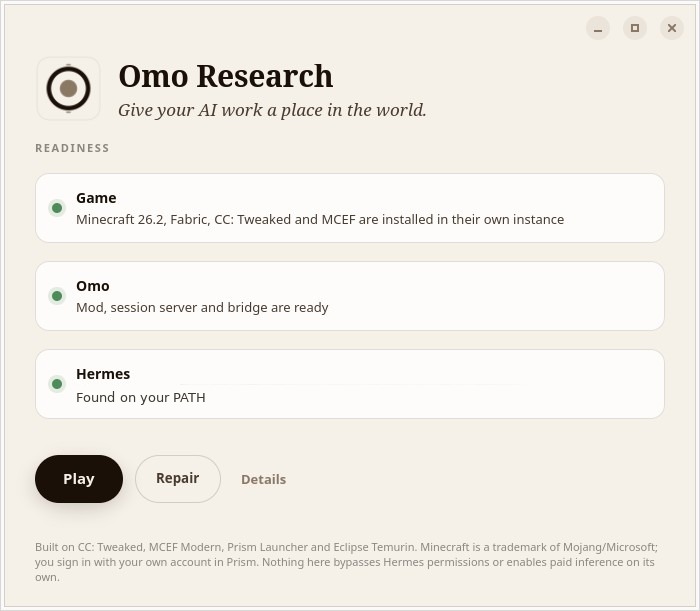
The builder pushed back: a launcher in the omo.sh style, not a wrapper around someone else's. The result is a small window that checks the game, the mod and Hermes, then offers Play and Repair.
02 / How it worked
- One window with three readiness checks: Game, Omo, Hermes.
- It downloads a pinned, hash-verified runtime into its own folder.
- Repair re-checks every file and never touches saves, sign-in, workspaces or Hermes settings.
- Until our own Microsoft sign-in is approved, it still runs a private, hidden copy of Prism Launcher to sign in and start the game.
- Falls back to a terminal menu when there is no display.
03 / What we saw
The window looks like ours, but the sign-in still goes through Prism. Later the window turned out to crash on older Linux systems, which needed fallbacks.
04 / Where it led
It shipped in release candidate 1.1 and is the way Omo Space is installed today.
Sources
- Product spec, V1 draft. internal product spec, 16 Sep 2026
Explicitly NOT a from-scratch launcher UI.
- Claude Code prompt. prompt, 17 Sep 2026
can we use our own launcher? not prism?
- Build prompt. build prompt, 26 Sep 2026
I want the gui to be fully branded omo.sh style, not a wrapper of prismlauncher etc.
- Launcher source. launcher source, Sep 2026
Omo Research: the one window a player sees. Install, sign in, play.
- Public changelog, Unreleased. github.com/omoresearch/omo-space/blob/main/CHANGELOG.md
The launcher window opened on nothing older than Pango 1.56