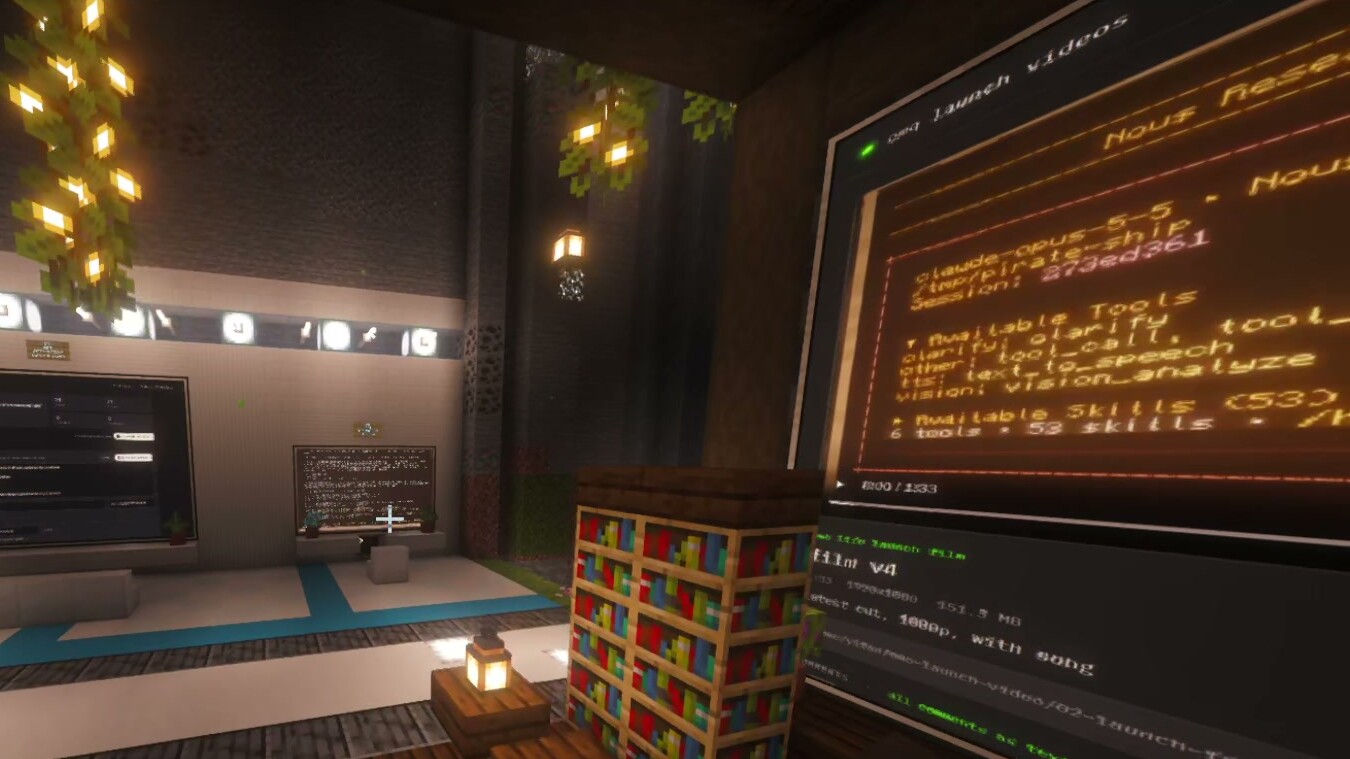
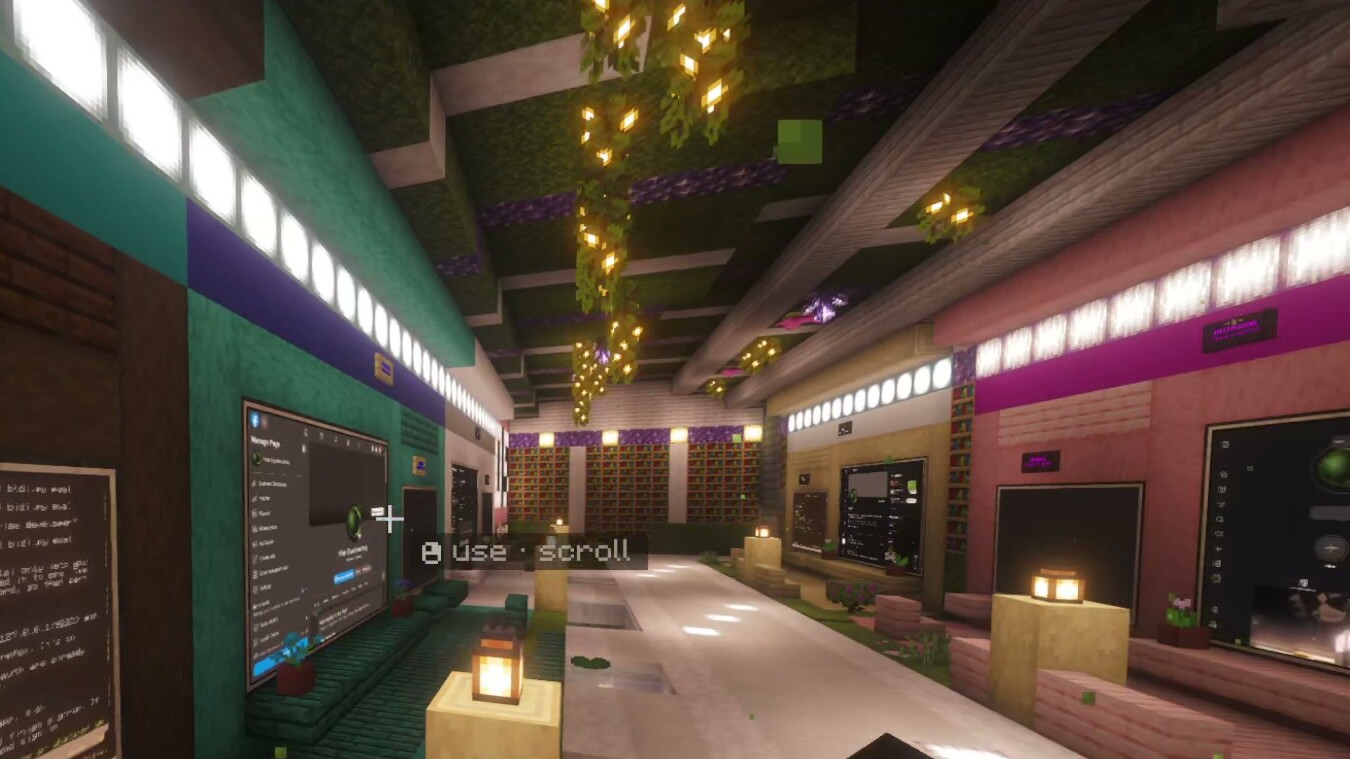
 (a) Terminal + web wall
Omo Research · preprint draft v1.930 October 2026
Worlds, Not Windows
Spatially Aware Creative Agentic Interfaces
Omo Research
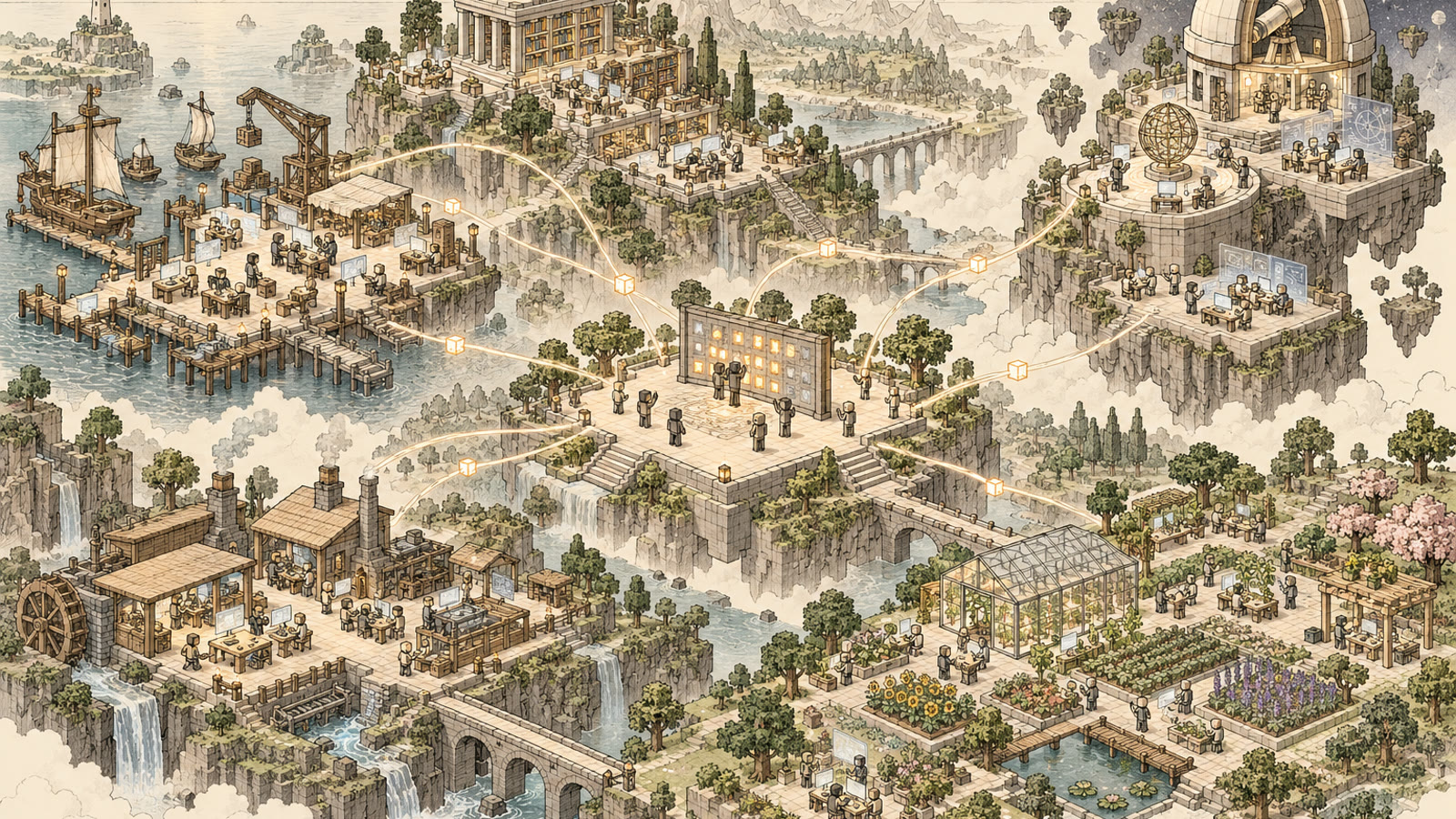
Abstract. AI agents now run for hours, many at a time, yet we still manage them through chat windows and terminal tabs. With twenty agents running, the tab bar no longer shows which agent is which, or which one needs you. We tried something else: we gave each agent session a place in a Minecraft world. Omo Space is a mod that puts real agent sessions (Hermes Agent, Claude Code) and live web pages on in-world screens. Lamps show when an agent is working. The sessions keep running on the user’s computer, and coding agents build most of the places from short requests. This paper shares findings so far from the builder’s own use. He worked in it every day while streaming (25–29 October 2026), and a friend built his own world with it. From about 29 hours of transcribed streams, we describe four ways place got used: to find work by walking to it, to resume by coming back to it, to monitor by glancing at lit screens, and to orchestrate a pipeline by moving work from place to place. The agents’ own logs show his real usage: about 7 billion tokens over the five days, and over 4 billion on 28 October alone. We have not compared it with tabs. We describe what it was like, what it suggests, and what we would like to measure next.
Keywords: agentic interfaces; spatial interfaces; persistence; ambient awareness; multi-agent supervision; generative environments; Minecraft; autobiographical design
1 Introduction
AI agents have gone from one chat to many long-running sessions that write code, do research and edit video. They work for hours, wait for approval and ask questions. Most of us still run them in chat windows or terminal tabs. That works for one agent. With twenty, the tab bar no longer shows which session is which, which is busy, and which is waiting for you.
The builder put the motivation this way on the first night of streaming:
“So it’s like I’m spatially aware of my workspace. … It’s not a chat window, it’s an interface.”[P1, T1, 00:38:33–00:38:50, live]
Using space to organise computer work is an old idea, from Rooms (1986) to Data Mountain (1998) and the Task Gallery (2000) [1][2][3]. But agents are a new kind of thing to organise. They keep working when you look away, they finish, and they ask for help. We wanted to know what a world of places does for that kind of work.
What this paper is. Findings so far from one person building and using his own tool. Nothing was set up as a test: the builder used Omo Space for his real work, live on stream, and a friend tried it too. We went back through the recordings and wrote down what happened, in his own words. Quotes are what people said, not measured outcomes. We do not claim the world beats tabs; Section 7 lists what we would like to measure next.
We contribute:
- A system. Omo Space: live agent sessions and web pages as objects in a Minecraft world, with status lamps and agent-built places (§3).
- Findings so far. Five days of the builder’s daily use, from about 29 hours of stream transcripts (§4).
- What we learned. Four uses of place, web pages with a terminal attached, and places at every scale (§5).
- What to do next. Design lessons and what we would like to measure next (§6–7).
2 Related Work
2.1 Space, memory and interruption
Space helps people remember and return to work. Malone found that piles of papers do more than store things: “a very important function of desk organization is to remind the user of things to do” [4]. Rooms brought this into software with virtual workspaces, to cut “window thrashing” [1]. Data Mountain reported “statistically reliable advantages” for placing documents in space over a favourites list [2]. The Task Gallery hosted ordinary Windows applications in 3D and was found “enjoyable to use” [3]. People juggle many tasks and find switching hard [6]. They use spatial memory to return to “the general area where they were interrupted” [7]. Calm technology argues for displays that show state “without being obtrusive” [5]. None of it was about agents that keep working on their own.
2.2 Agents in game worlds
Minecraft is a common home for AI agents. Voyager explores and learns skills [8]. Mindcraft studies agent teams and finds that communication is a main bottleneck [10]. Generative Agents fills a game town with twenty-five agents that people can watch and talk to [9]. There the world is mostly where agents act. In Omo Space it is mainly the human’s view of, and controls for, agents whose real work (code, video, publishing) happens outside the game.
2.3 Supervising many agents
The closest recent work tackles the same problem with dashboards. ParallelPilot adds planning, a run-logger and “an ambient dashboard alongside existing coding tools” [19]. In a study with 16 people, participants “supervised an average of one more concurrent agent at peak” [19]. AgentGUI is built for “observing and steering AI agents amid multiple concurrent, long-running sessions” [20]. Magentic-UI offers “co-planning, co-tasking, multi-tasking, action guards, and long-term memory” [21]. Generative UI shows that models can generate “not just the content, but the interface itself” [22]. Spatial hypertext found that “a visual/spatial metaphor … allows people to express the nuances of structure” [23]. Table 0 compares these systems. Omo Space adds one combination: places, built by people or agents, that hold long-running sessions and agent-made pages. Unlike ParallelPilot and AgentGUI, it has not been tested with users. It has no action guards, and its lamps show activity but not when an agent is waiting for you.
Table 0. Omo Space and the nearest systems, as described in the sources we read (mostly abstracts and introductions). n/i: not established by that source, not necessarily absent.
| System | Concurrent sessions | Where jobs run; persistence | State / intervention cues | Generated interface | Spatial organisation | Evaluation (task) |
|---|---|---|---|---|---|---|
| ParallelPilot [19] | Yes | Existing coding tools; n/i | Ambient dashboard; intervention cues | n/i | n/i | Within-subjects N=16 (short coding tickets) |
| AgentGUI [20] | Yes, long-running | Locally hosted; n/i | Trace visualisation; steering | n/i | n/i | Controlled study (finding key elements in traces) |
| Magentic-UI [21] | Multi-tasking | Web, code, files; n/i | Action guards; co-planning | n/i | n/i | Benchmarks, simulated users, qualitative study, safety tests |
| Generative UI [22] | n/i | n/i | n/i | Custom pages per prompt | n/i | Human preference ratings |
| VIKI [23] | n/i | n/i | n/i | n/i | User-arranged 2D space | n/i |
| Task Gallery [3] | Applications | Unmodified Windows apps | n/i | n/i | 3D gallery (authored) | User studies |
| Omo Space | Yes | tmux on user’s machine; survives client exit | Lamps, lit screens; no waiting state | Pages and places | Generated places, any scale | None yet (findings from own use) |
2.4 How we looked back at it
Learning from your own use of a tool you built is called autobiographical design: “design research drawing on extensive, genuine usage by those creating or building a system” [16]. It has an autoethnographic flavour [18]. We borrow the steps of thematic analysis [15]. AI models did the first reading, so we call it an AI-assisted thematic synthesis. AI coding matches experts reasonably well with a fixed codebook [17]. Ours was open-ended, so we also checked the outputs by script (§4.4).
3 System: Omo Space
Omo Space is a Fabric mod for Minecraft Java 26.2 plus a small local bridge [11][12]. We describe source snapshot 75d4677 (27 Oct 2026); the builds used day to day were not recorded. At the time it ran on Linux only [11].
3.1 What is in the world
Each object in the world stands for something on the user’s computer (Table 1). A workspace is a named terminal session (tmux) with one or more tabs. Each tab runs an agent (Hermes, Claude Code, Codex) or a plain shell. Each Hermes agent has its own profile: memory, skills and model. A station is the in-world computer block for a workspace. Views (wall monitors, slim screens) show a tab or a live web page; several can show the same workspace. A place is anything you build around them, from a room or cave to a tower or a world. Places are just builds: they run nothing.
Table 1. In-world objects and their counterparts on the user’s machine [11].
| Object | Counterpart on the machine |
|---|---|
| Hermes Computer (station) | A named workspace whose first tab runs a Hermes agent in its own profile |
| Terminal | A workspace tab running a shell or another agent CLI |
| Monitor wall / Slim Screen | A larger view of a tab, or a pinned live web page (embedded Chromium) |
| Linker | Links a view to a workspace without placing it next to the station; several views can mirror one |
| Status Lamp | Follows a linked station, or else the nearest station within 8 blocks. Gold if any live tab is busy, green otherwise, red once interrupted, dark with no live workspace |
| Name Plate | The workspace name, readable from a distance |
Lamps have no state for waiting for your answer (source: StationStatus.glow). Agents do not pass work to each other through the world, and a friend who loads the same map gets fresh workspaces [11]. So a pipeline across places runs on the user’s own scripts and agent instructions, not on the mod.
3.2 What survives what
Agents keep running when the game closes; only a computer restart stops running jobs (Table 2). Each Hermes tab is one named conversation (hermes -p <profile> chat --tui -c omo:<workspace>:<tab>), so reopening a screen brings it back [11]. After a restart, saved conversations resume with a button. Idle Hermes tabs nap after 20 minutes unseen and wake when shown again. Apart from that, “Nothing is ever re-run without you” [11].
Table 2. Lifecycle by event, as documented [11], not tested for this paper. Minecraft saves the world layout; web-page state on walls is not covered.
| Event | Shells and running jobs | Hermes conversation |
|---|---|---|
| Close the view, walk away | Keep running | Keeps running |
| Quit or crash Minecraft | Keep running | Keeps running |
| Restart the bridge | Keep running | Keeps running |
| Hermes tab idle and unseen 20 min | — | Exits cleanly; resumes when shown |
| Host restart, or tmux server stops | Lost | Saved; tab shows INTERRUPTED; user presses Resume |
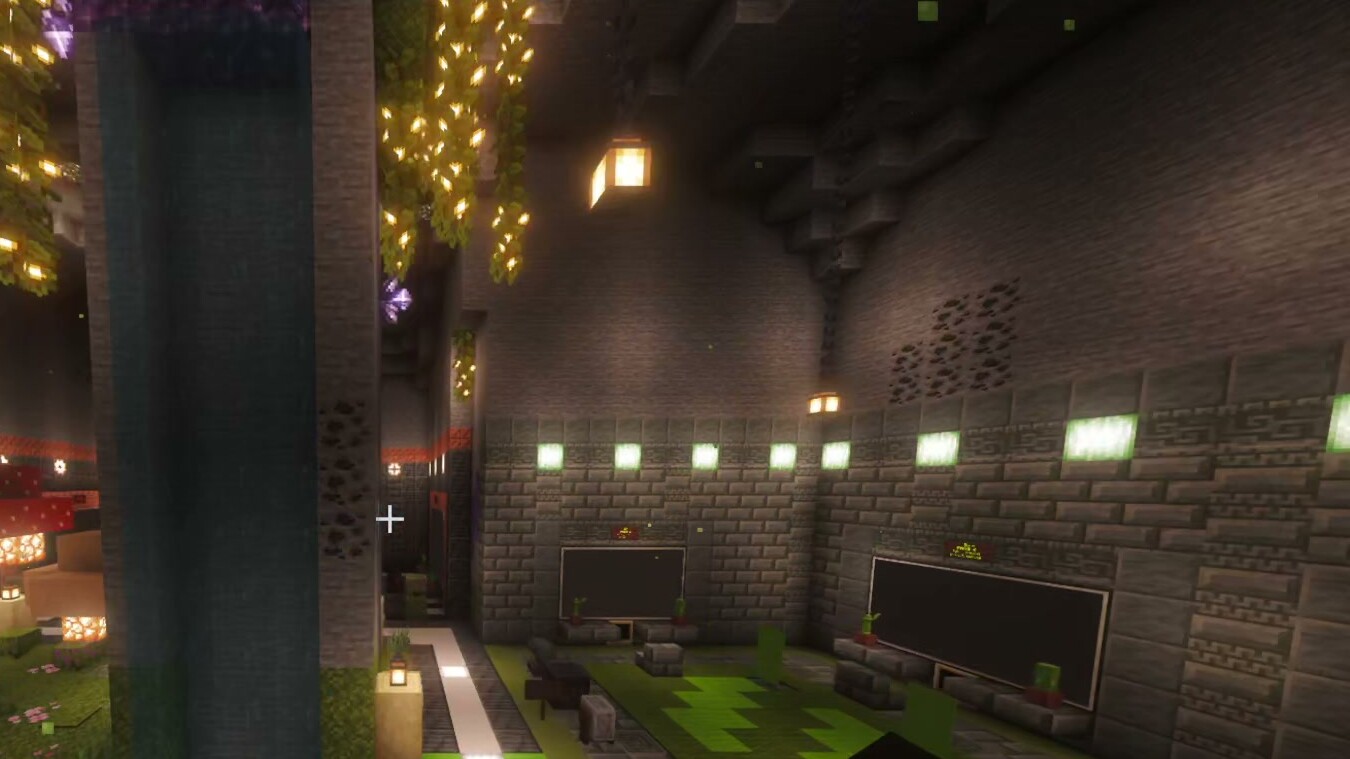
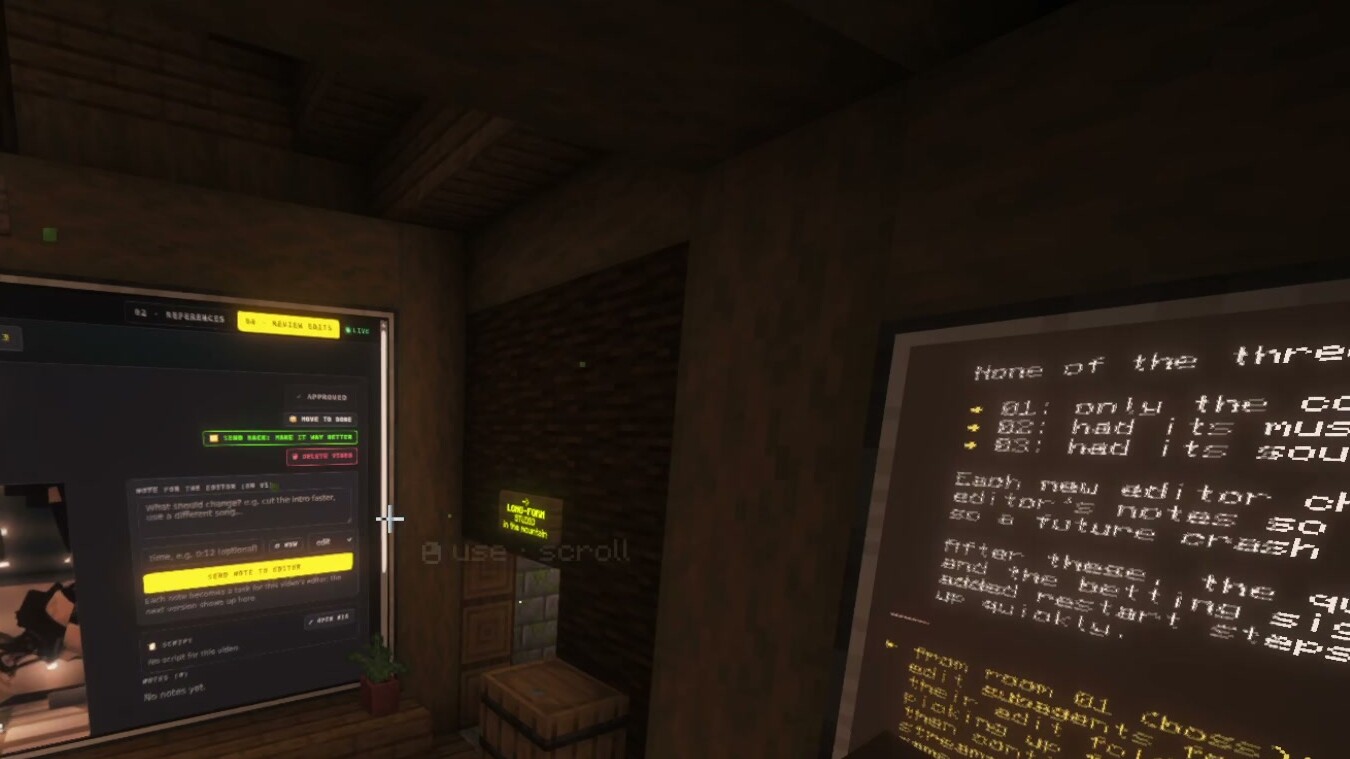
(a) Terminal + web wall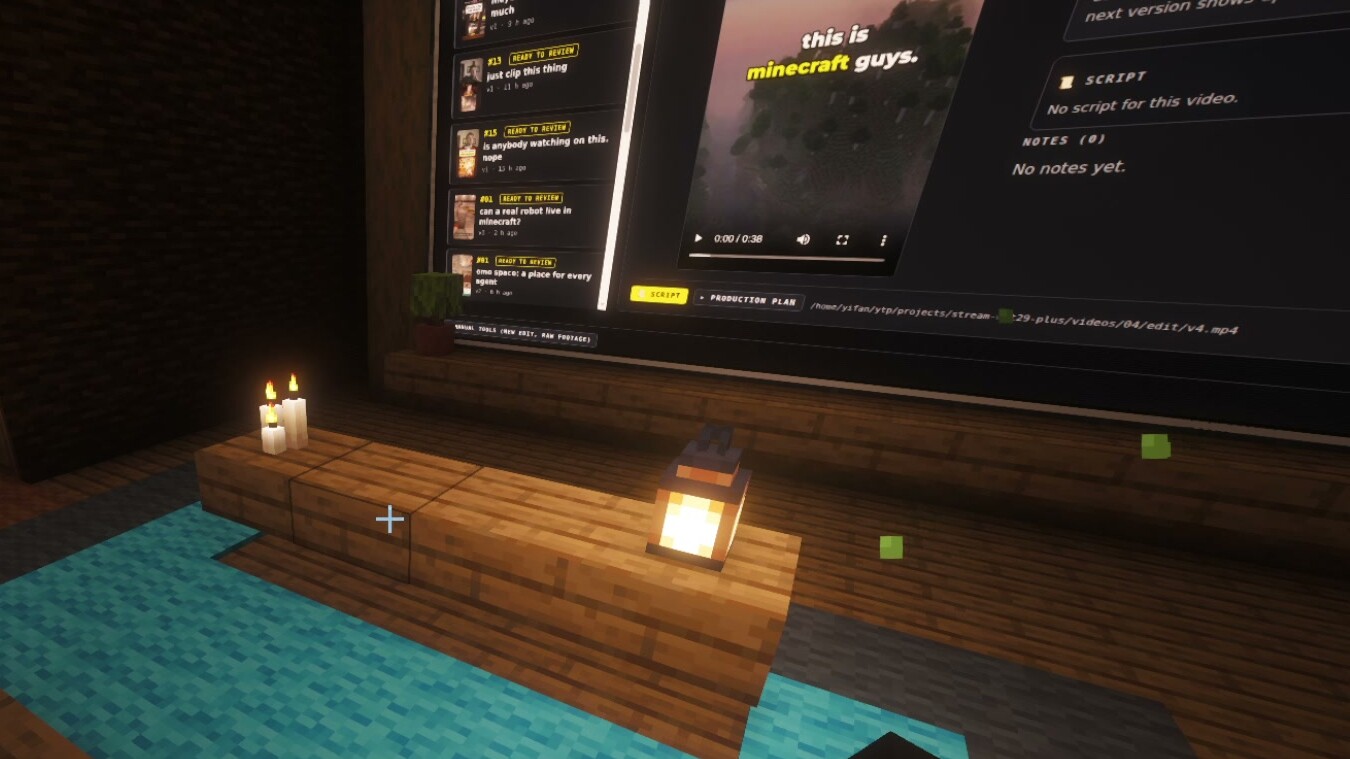 (b) Review wall
3.3 Places built by agents
Coding agents build and change places from plain requests, and people also build by hand. Agents can have bodies too, such as a Hermes-driven player [13] and simulated robots, but bodies are outside the scope of this paper.
4 How We Looked Back
4.1 Who used it
From 25 to 29 October 2026 the builder (P1), a solo developer, used Omo Space as his main workspace while streaming to Twitch and YouTube. He ran his real content pipeline (ideas, references, recording, editing, publishing, analytics) with about one agent profile per stage, linked by his own scripts. A friend (P2), new to Hermes and on Windows, built his own world from the public repository with Claude Code’s help and showed it on two streams. His set-up time and ease of use are his own account; we did not inspect his code.
4.2 Data
The material is seven stream recordings and four short pickups, transcribed by Whisper (small) with a timestamp on every line. We split it into eight segments totalling 29.05 hours (Table 3). This is recorded time from first to last timestamp (corpus_manifest.py), including silence, chat and replayed clips. Two stretches were not analysed: the first 93 minutes of the 28 October part-2 recording (only partly transcribed), and 29 October after 3 h 44 min (not yet transcribed). The transcripts have no speaker labels, so speakers are inferred from context; for P2 we mark this at each quote.
Table 3. Corpus and extracted records per segment. Records are not distinct events; a repeated clip or scripted take can yield several.
| Seg. | Recording (2026) | Hours | Theses | Quotes | Demos |
|---|---|---|---|---|---|
| T1 | 25 Oct, 02:08 (first stream) | 2.80 | 17 | 59 | 18 |
| T2 | 25 Oct, 18:56 + pickups (incl. 26 Oct) | 1.99 | 15 | 60 | 17 |
| T3 | 25 Oct, 23:41 | 3.90 | 17 | 55 | 14 |
| T4 | 27 Oct, 18:03 | 3.77 | 17 | 59 | 25 |
| T5 | 28 Oct, 01:36, 0:00–4:40 | 4.65 | 16 | 64 | 20 |
| T6 | 28 Oct, 01:36, 4:40–9:20 | 4.67 | 18 | 54 | 23 |
| T7 | 28 Oct, 11:40, 1:33–5:07 | 3.57 | 16 | 59 | 21 |
| T8 | 29 Oct, 16:19, 0:00–3:44 | 3.70 | 17 | 59 | 18 |
| Total | 29.05 | 133 | 469 | 156 |
4.3 Real usage
Hermes’ own token counters show how much agent work actually ran (Table 4). Over the five days the builder’s agents used about 7.1 billion tokens in 43,157 model calls. On 28 October alone they used about 4.2 billion (3.75 billion counting only sessions that started and ended that day). The next day, 30 October, was busier still: 4.7 billion, with 20 agent profiles active. By 29 October twelve profiles were running, roughly one per pipeline stage.
Most tokens are re-read context, not new text. From 24 October to 1 November, 95.7% were cache reads: each step of a long-running agent re-reads its whole conversation from the provider’s prompt cache. Output was 66 million tokens (0.5%), and 99.3% of tokens went to Claude Opus 5.5. Hermes estimates the five days at about $3,400 at list prices; no billed cost is recorded. The counters cover all his Hermes work, including sessions never shown in the world, so they do not show how much Omo Space caused. The script and per-day data are in the project’s usage/ folder.
Table 4. Real usage from Hermes’ per-session token counters across all 45 local profile databases (read 1 Nov 2026). Days in AEDT; sessions past midnight are split by time. Sessions include sub-agents and scheduled jobs. Cost is a list-price estimate, not an invoice.
| Day | Tokens | API calls | Agent profiles | Sessions | List-price estimate |
|---|---|---|---|---|---|
| Sat 25 Oct | 0.09 bn | 970 | 3 | 33 | $32 |
| Sun 26 Oct | 0.63 bn | 5,004 | 9 | 137 | $311 |
| Mon 27 Oct | 0.56 bn | 3,989 | 9 | 94 | $323 |
| Tue 28 Oct | 4.17 bn | 25,386 | 11 | 537 | $1,978 |
| Wed 29 Oct | 1.61 bn | 7,808 | 12 | 159 | $730 |
| Five days | 7.07 bn | 43,157 | — | — | $3,374 |
| Thu 30 Oct (after) | 4.67 bn | 21,050 | 20 | 229 | $2,094 |
4.4 Analysis
Reading. A separate AI reader (Claude Opus 5.5) read each segment in full. It listed each claim about the interface with 1–4 exact timestamped quotes, plus live demos, doubts and counter-evidence, and guest reactions. All readers shared one brief, which asked what the builder was “trying to SAY/PROVE” and gave example claims. So the brief looked for his intent and may have nudged the readers (Appendix A).
Grouping. An AI drafting assistant (also Claude) grouped the 133 segment-level claims into cross-segment themes. P1 checked them against what he meant; no second person coded the material. Appendix C lists the themes, rules and counts; the findings do not rest on the counts.
Labels on quotes. Each quote is tagged live (said while working), take (a scripted promo line recorded in the world) or playback (an edited clip replayed on stream). Takes show what P1 wanted to say, not what happened. We worked from transcripts, not video.
Checks. One script confirmed that all 791 quotes the readers extracted appear in the transcripts within 3 minutes of their timestamps. A stricter script checks each quote in this paper against its own segment’s transcript within 90 seconds, and literature quotes against the fetched sources (Appendix B). On v1.9 it found no failures. The checks show the words are there, not who said them.
4.5 Privacy and consent
The streams were public, and P1 is the system’s author. Figures 3–5 are cropped so that no face camera, chat, viewer names or stream labels show. P2 is not named here, and everything quoted was said on public streams.
5 What We Found
We group what happened into four uses of place: find, resume, monitor and orchestrate (Table 5, §5.1–5.4). This is our reading of the material, not a set of proven effects.
Table 5. The four uses of place at a glance: what each looked like, what the builders said helped, and our lesson.
| Use | What it looked like | What helped | Lesson |
|---|---|---|---|
| Find | Walk to the agent’s place | Remembering places, not tab positions; about 25 sessions at once | Places help you find work if they stay put and stay readable |
| Resume | Come back to where you left it | Agents still running after quitting the game | The place is an address; each kind of state needs its own guarantee |
| Monitor | Glance at lit screens and lamps | Screens “turn on” when an agent works (T8, 00:48:43, live) | Being busy and waiting for you are different signals |
| Orchestrate | Move work from place to place | Pipeline stages visible as rooms | Layout does not move work; hand-offs must be explicit |
 (a) Find
 (b) Resume
 (c) Monitor
 (d) Orchestrate
5.1 Find: walking to the work
Each workspace sits in a fixed, named place, so you remember where an agent is rather than which tab it was in. P1 put it most sharply in a scripted take:
“Nobody remembers which of the 12 terminal tabs are doing what but you can remember space and rooms … It’s the oldest memory trick out there.”[P1, T6, 07:14:29–07:14:46, take]
Live, he named the problem: “Getting lost with all these tabs and things” [T1, 01:13:45, live]. He described about 25 sessions running at once, “within the interface that we can conceptually understand” [T6, 07:37:22, live]. The logs show 537 sessions on 28 October, counting sub-agents and scheduled jobs. Whether spatial memory helps with agents as it did with documents [2], is what H1 would measure.
5.2 Resume: coming back to it
Because agents run outside the game (Table 2), leaving it does not stop them, and the places wait for you. After quitting and reloading on the first night, P1 said: “So we can close it enjoy our day And then Come back Boom the agents are still working right here” [T1, 02:12:55, live]. On 29 October he said agents had kept editing about 22 clips after he closed Minecraft [T8, 00:06:30–00:08:38, live]. Separately, after turning the computer off and on, he found “everything’s persistent” [T8, 00:11:55–00:11:59, live]. A restart keeps the world and saved conversations, not running jobs, so these were two separate moments. He tied this to how it felt to start work: “I’m not dreading any pain / Or like context loss because I know anytime I want to work on the robotics project / I just fly down here” [T4, 02:21:42, live].
5.3 Monitor: glancing at lit screens
Lamps and lit screens let you read activity from across the room, much like calm technology [5]. P1’s clearest lines are takes recorded in the Batcave: “because every light that you see in there is an agent still working” [T5, 00:36:26, take] and “Now you can see your whole team from the hallway.” [T5, 00:39:00, take]. P2 described the same cue live, in his own world: “How I can tell when the task is like running because their screen will turn on” [T8, 00:48:43, live; P2, inferred].
Lamps show who is busy, but not yet who is waiting for an answer. That is the next signal to build (H3).
5.4 Orchestrate: moving work between places
P1 laid out his content pipeline as a row of places, about one stage and one agent each: “We just go to that room and just start building / And when we’re done, then we just leave that room” [T2, 01:04:14, live]. In a take he summed it up: “This video went through all five rooms before you saw it” [T5, 00:34:55, take]. Approving was described as one in-world step: “once you press approve inside the game, it just gets posted” [T8, 00:56:28, live; speaker unclear].
The hand-offs are his own scripts (§3.1); the layout made the stages visible and easy to visit.
5.5 Web pages with a terminal attached
On the last day P1 described the idea in its most general form, apart from Minecraft:
“the concept of spatial interfaces with persistent webpages is easy to use and talk to and control. … We’re doing it inside Minecraft, but I believe there is not enough … attention, these persistent webpages with a terminal attached to it. And with this, you can build whatever pipeline that you want.”[P1, T8, 03:38:57–03:39:18, live]
Pieced together from several moments, the pattern is this. An agent at a station makes a page for one job, such as a review queue, an analytics view or a publishing form. You pin it on a wall where it belongs, check it, and approve or ask for changes through the terminal beside it. Later you come back to it. The page does the job; the place gives it a fixed home next to related work. An ordinary browser tab could host the same page, and we did not separate the two effects. Episode A shows one piece of this.
Episode A: leave and return (T1, 02:10:30–02:13:16; live). Set-up. P1 pins a web page on a wall beside working agents: “And then I get pins page to forever be here” [T1, 02:10:40]. Action. He closes the world: “I’m closing it entirely” [T1, 02:12:03]. Result. On reloading: “Boom the agents are still working right here” [T1, 02:13:04], and “Web page is still here” [T1, 02:13:12]. What it shows. The agents survived, as documented (Table 2), and so did the pinned page.
5.6 Places at every scale
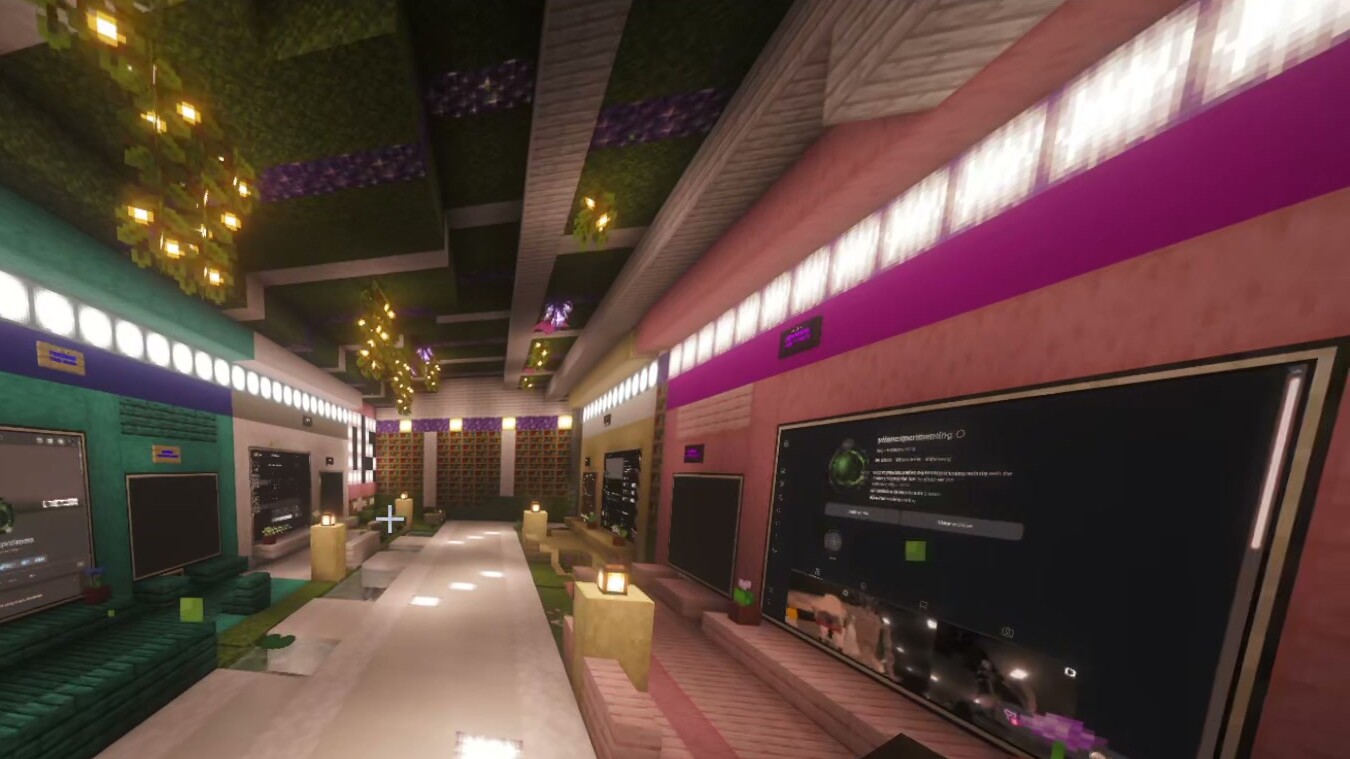
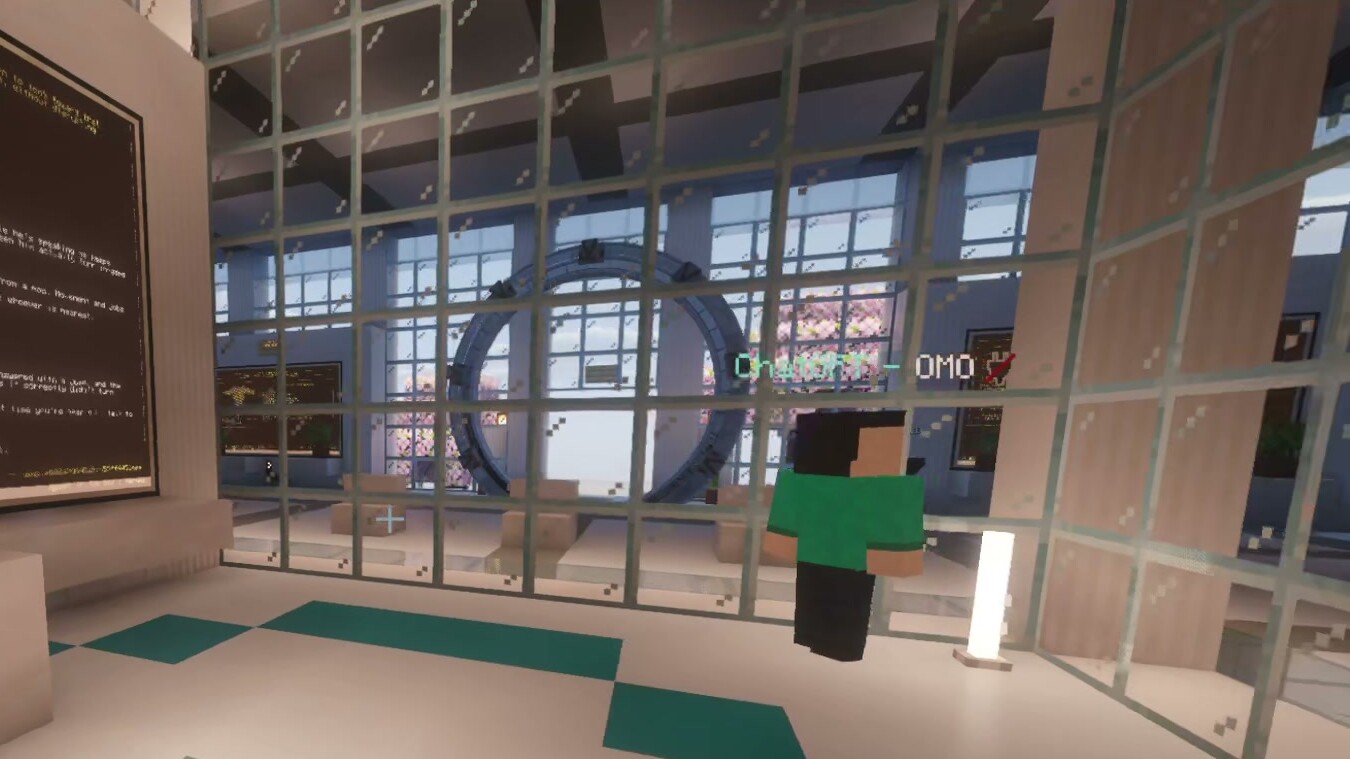
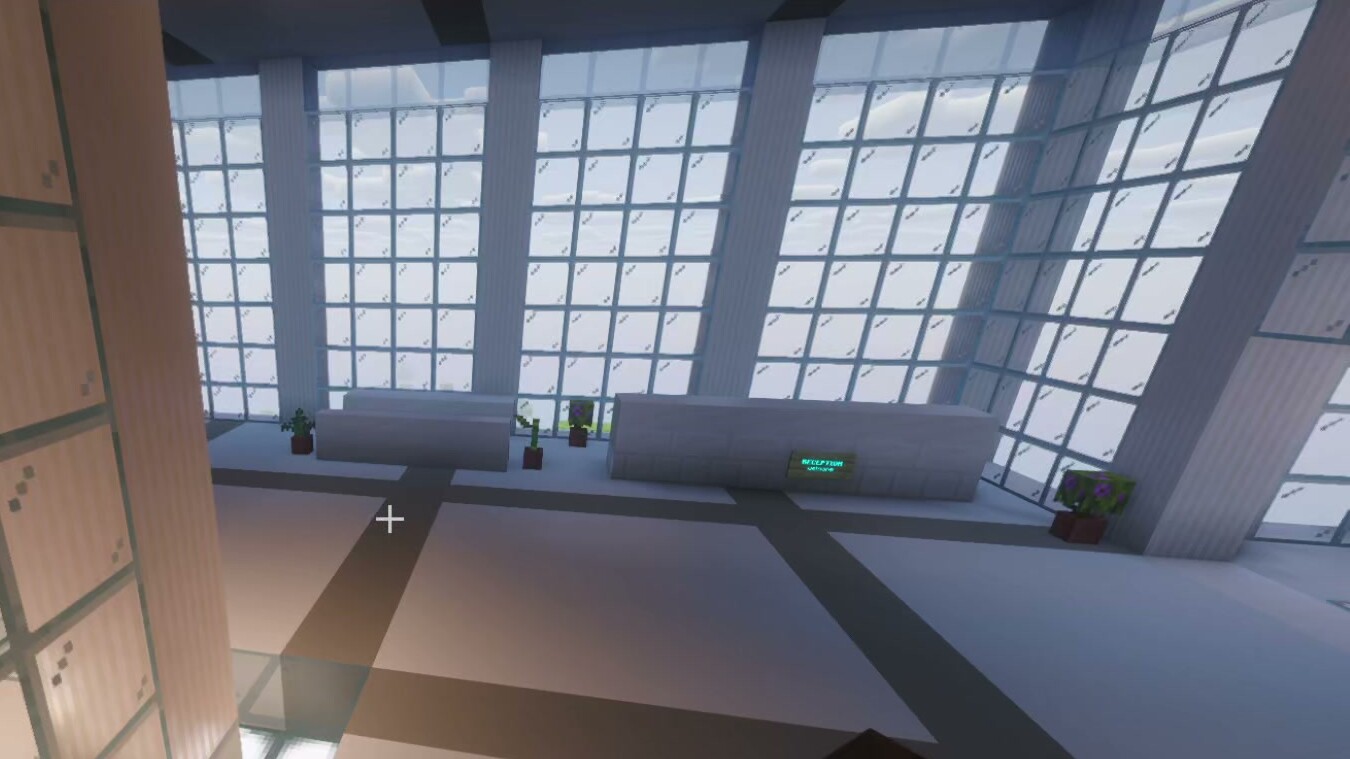
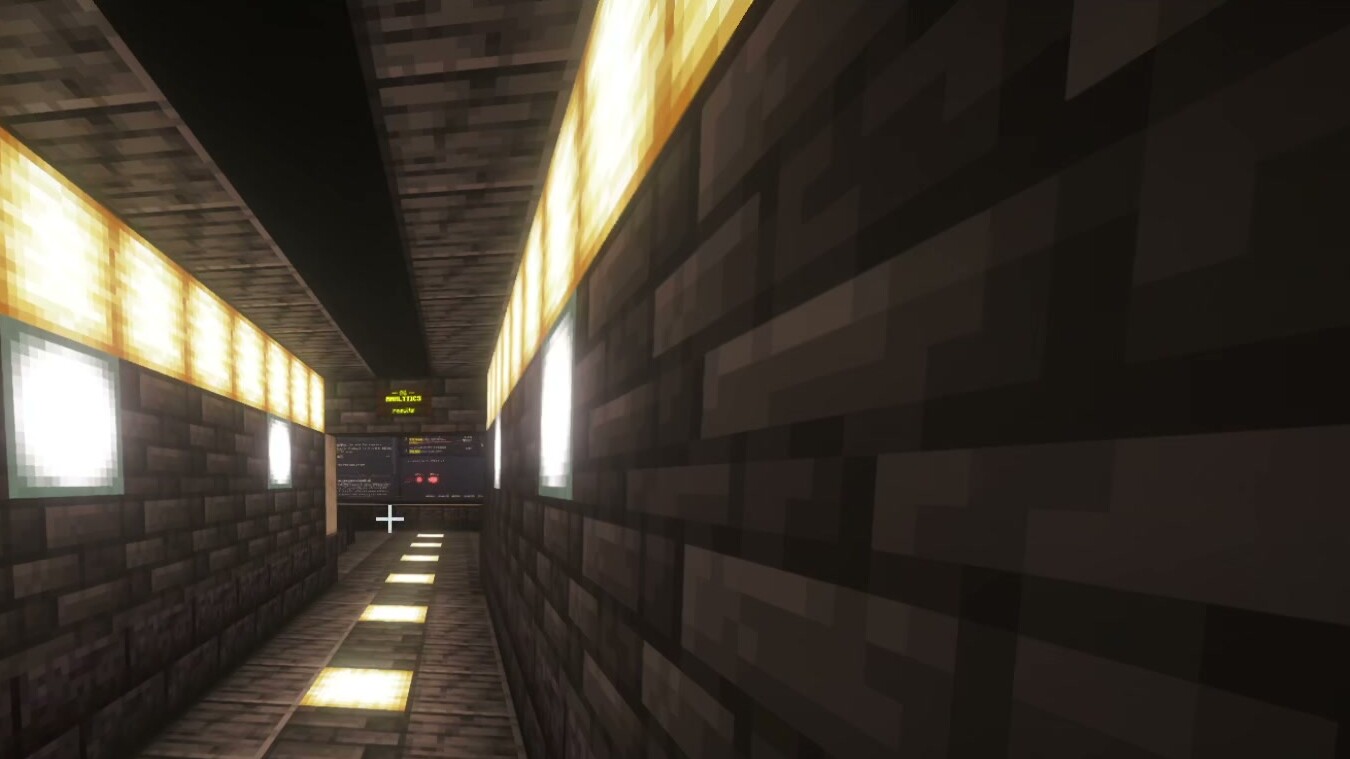
The places were not just rooms: people chose each place’s shape and size to fit the work. P1 ran his content pipeline through a cave of five rooms. He wanted whole worlds for lines of work: “We can build a whole world for the paid ads” [T7, 02:48:38, live]. He even imagined a pirate ship holding your tax work [T6, 08:09:08, live]. He said agents did most of the building: “I didn’t build any of this” [T6, 07:45:10, live]. Sometimes he liked to build by hand: “I also think it’s quite nice to just build with hand” [T1, 02:25:32, live].
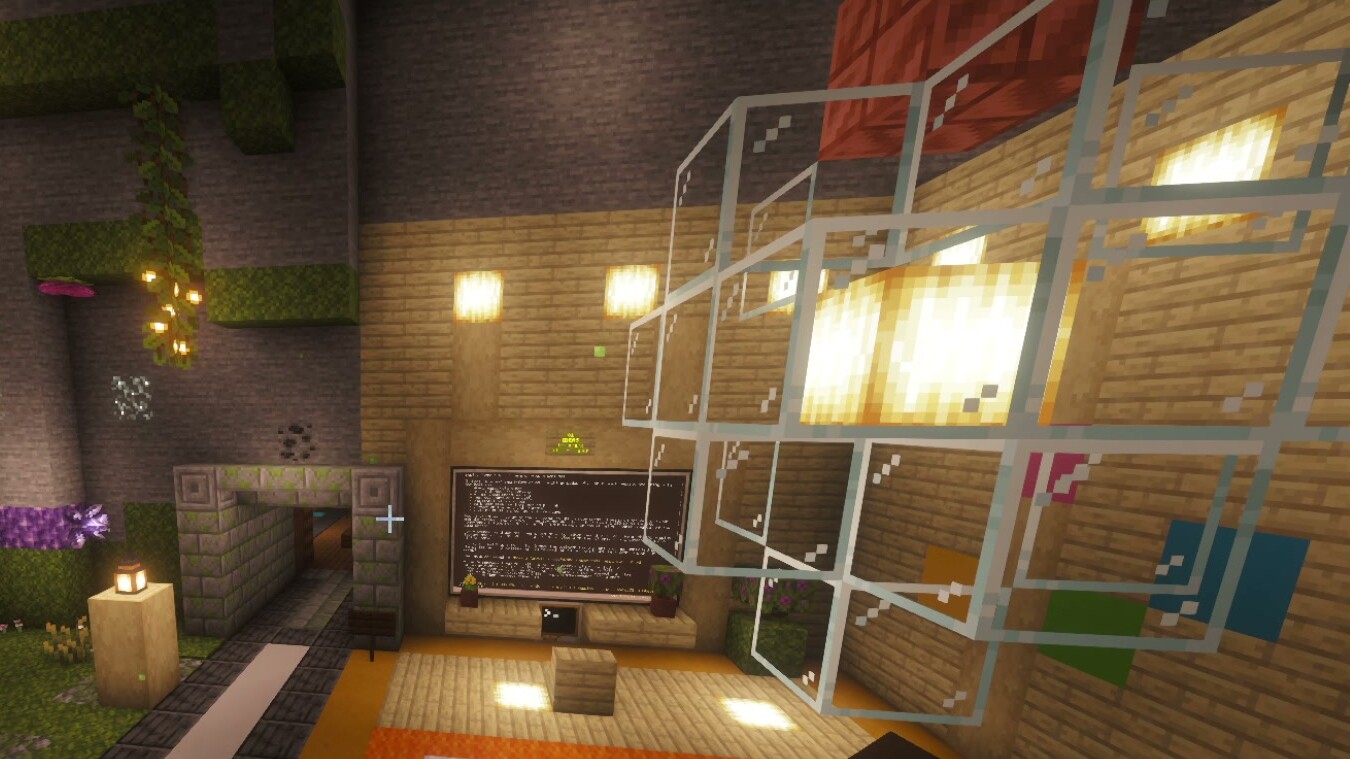 (a) Atrium
 (b) Hall
 (c) White hall
 (d) Tunnel
5.7 A friend’s world
A friend built his own world and took the idea his own way. P2 had never used Hermes before [T8, 00:59:38]. He described about 24 hours of work [T8, 00:54:32] with little troubleshooting: “It just gave Claude the GitHub and then gave it a few prompts and then it just it built the world” [T8, 01:04:44, live; P2, inferred]. On his screen-share he showed an AI office with a manager agent, teams for web, social and IT, and a podium for talking to the whole team. Agents walked to their seats at a conference table, and a sports arena showed live scores [T8, 00:28–01:13]. The manager, seating and podium were his own additions, not part of Omo Space. The day before, P2 had called a page-only setup “claustrophobic” [T7, 04:16:50, live; P2, inferred].
6 Discussion
6.1 Design implications
Six design lessons follow.
- Give agent work a lasting, recognisable place, while allowing several sessions per place and mirrored views.
- Separate address from state: say separately what survives for processes, conversations, pages and the world (Table 2).
- Tell activity apart from a request for attention, and do not rely on colour alone.
- Show honest state: never show progress that is not happening, and re-run nothing for the user except the documented idle resume.
- Let the work choose the shape: places of any size, built by agents or by hand.
- Make hand-offs between places explicit objects, not a side effect of layout.
6.2 Why a game world, and why people liked it
A buildable world lets agents make places from requests, and lets other people build their own. Earlier 3D workspaces were designed by their makers [3]. This openness gave us places at every scale (§5.6) and P2’s world (§5.7).
Both builders also chose where to work and said they liked being there. P1 described moving between reading and coding: “I can uh, read and then I can go to the other room … Do some coding or whatever and then go back to like reading and it’s all together in one place in my mind” [T3, 02:01:07–02:01:11, live]. P2 said watching the team “makes this like AI coding and building stuff just more fun” [T8, 01:00:57, live; P2, inferred].
6.3 Limitations
- Just us so far. One builder and one friend, using the tool for real work. There is no comparison and no measured outcome, so these are lessons from use, not proof that worlds beat tabs.
- The builder is the author. P1 built the system and was streaming, and some key lines are promo takes or replayed clips (§4.4). Learning from your own system shows a lot, but it leans toward your own needs [16].
- Analysis. AI models did the reading and grouping; P1 checked them, with no second human coder.
- Transcripts. Whisper (small), with no speaker labels, and key moments not yet checked against the audio. One line reads “I don’t think Minecraft is superior” (T6, 08:33:45). It may be misheard; until someone listens, we leave it open.
- Coverage. About 29 hours analysed; two stretches were not (§4.2).
- Pictures. The figures show what the interface looks like, not results. Figures 3–5 are from 30 October, the day after the five days; Figure 1 is generated.
7 What We Would Like to Measure Next
None of this has been tested yet. Table 6 sets out how we would compare three of the four uses against ordinary tabs, and look at generated places from logs. The tab setup must be fair: same agents, same persistence, good names, status badges and search. Then any difference comes from space, not better tools. Orchestration waits until hand-offs are real features.
Table 6. Proposed studies. H1–H3 are within-subjects and counterbalanced. Sample size (about 16–24) is provisional, pending a pilot and power analysis. H4 is an observational log study.
| Study | Prediction | Manipulation | Measure |
|---|---|---|---|
| H1 Find | Named sessions are located faster in the world than in tabs, and the gap widens with session count. | Interface (world, tabs) × sessions (12, 24) | Time to locate; wrong selections |
| H2 Resume | After a 24 h break, time to first useful action is shorter in the world. | Interface; 24 h delay; useful action defined in advance | Resumption lag; errors |
| H3 Monitor | With a proposed waiting for you lamp state (not yet built), a blocked session in view is noticed sooner than with matching tab badges. Out of view it is not, unless escalation is added. | Interface × visibility (in view: same room or visible tab strip; out of view: other room or workspace) × escalation (off, on); same event schedule | Detection latency; misses (unnoticed within 5 min) |
| H4 Build (obs.) | Most one-prompt places are used without revisions after they are generated. | None; log every build attempt started in days 1–30 (failed and abandoned too) and follow each for 14 days (to day 44) | Author acceptance; still in use after 14 days; revisions; independent usability rating against a pre-registered checklist |
In H2, useful action is the first edit, approval or instruction that moves the interrupted task forward. Participants practise each interface until they finish two trials unaided. Task versions are matched by session count and event schedule. In H4, a one-prompt place comes from one plain request with no follow-up; any later edit, by hand or by agent, is a revision. Some data already exists: bridge logs of sleep, resume and INTERRUPTED events, the Hermes session stores and the recordings.
8 Conclusion
Chat windows were made for one conversation. Agent work is now many conversations that keep going when you look away. We gave that work places in a world you can build, from a single room to whole worlds. Its builder described finding, resuming, watching and routing agent work by moving through them, and a friend took the idea his own way. Whether worlds beat windows is still open; §7 sketches how we would find out.
Data and Materials
All working files are kept in the project folder: extractions, reader prompts, synthesis, theme matrix, corpus manifest, quote verifiers, citation ledger and review history. They are not public, because they identify P2 and other speakers. A redacted evidence subset will be prepared before any release. Raw recordings are not released.
AI Use Disclosure
Claude models did the first-pass extraction and proposed the themes, coverage counts and draft text; P1 reviewed them. An independent model (GPT-6 Astra) reviewed the draft against the evidence files and the drafting history. Scripts checked that quoted words exist (Appendix B), not how we read them. The drafting assistant rebuilt the Appendix C matrix after review.
References
- D. A. Henderson Jr. and S. K. Card. 1986. Rooms: The use of multiple virtual workspaces to reduce space contention in a window-based graphical user interface. ACM Transactions on Graphics. https://doi.org/10.1145/24054.24056
- G. Robertson, M. Czerwinski, K. Larson, D. Robbins, D. Thiel and M. van Dantzich. 1998. Data Mountain: Using spatial memory for document management. In Proc. UIST ’98. ACM. https://www.microsoft.com/en-us/research/publication/data-mountain-using-spatial-memory-for-document-management
- G. Robertson et al. 2000. The Task Gallery: A 3D window manager. In Proc. CHI ’00. ACM. https://doi.org/10.1145/332040.332482
- T. W. Malone. 1983. How do people organize their desks? Implications for the design of office information systems. ACM Transactions on Office Information Systems. https://doi.org/10.1145/357423.357430
- M. Weiser and J. S. Brown. 1995. Designing calm technology. Xerox PARC, 21 December 1995. https://calmtech.com/papers/designing-calm-technology
- M. Czerwinski, E. Horvitz and S. Wilhite. 2004. A diary study of task switching and interruptions. In Proc. CHI ’04. ACM. https://doi.org/10.1145/985692.985715
- R. M. Ratwani and J. G. Trafton. 2006. Now, where was I? Examining the perceptual processes while resuming an interrupted task. In Proc. 28th Annual Meeting of the Cognitive Science Society. https://escholarship.org/uc/item/7br305k1
- G. Wang et al. 2023. Voyager: An open-ended embodied agent with large language models. arXiv:2305.16291.
- J. S. Park et al. 2023. Generative agents: Interactive simulacra of human behavior. arXiv:2304.03442.
- I. White, K. Nottingham, A. Maniar, M. Robinson, H. Lillemark, M. Maheshwari, L. Qin and P. Ammanabrolu. 2025. Collaborating action by action: A multi-agent LLM framework for embodied reasoning. arXiv:2504.17950.
- Omo Research. 2026. Omo Space documentation: Agents and terminals. docs/AGENTS-AND-TERMINALS.md, revision 75d4677. https://github.com/omoresearch/omo-space
- Omo Research. 2026. Omo Space changelog. CHANGELOG.md, revision 75d4677. https://github.com/omoresearch/omo-space
- Omo Research. 2026. Omo, brought to life (v0.1.0). Source repository, README.md (local repository; revision not pinned).
- Omo Research. 2026. Stream analysis: per-segment extractions and synthesis of seven recordings and pickups, 25–29 October 2026.
- V. Braun and V. Clarke. 2006. Using thematic analysis in psychology. Qualitative Research in Psychology 3(2), 77–101. https://doi.org/10.1191/1478088706qp063oa
- C. Neustaedter and P. Sengers. 2012. Autobiographical design in HCI research: Designing and learning through use-it-yourself. In Proc. DIS ’12. ACM. https://doi.org/10.1145/2317956.2318034
- Z. Xiao, X. Yuan, Q. V. Liao, R. Abdelghani and P.-Y. Oudeyer. 2023. Supporting qualitative analysis with large language models: Combining codebook with GPT-3 for deductive coding. In IUI ’23 Companion. arXiv:2304.10548.
- C. Ellis, T. E. Adams and A. P. Bochner. 2011. Autoethnography: An overview. Historical Social Research 36(4), 273–290. https://doi.org/10.12759/hsr.36.2011.4.273-290
- T. Long, W. Shi, H. Mozannar, M. Murad and R. Hosn. 2026. ParallelPilot: Supporting coordination and monitoring in parallel AI coding. arXiv:2609.33113. https://arxiv.org/abs/2609.33113
- X. Zhao, J. Sohn, Q. Zheng and M. Moor. 2026. AgentGUI: An interface for observing and steering long-running AI agents. arXiv:2607.26300. https://arxiv.org/abs/2607.26300
- H. Mozannar, G. Bansal, C. Tan, A. Fourney, V. Dibia et al. 2025. Magentic-UI: Towards human-in-the-loop agentic systems. arXiv:2507.22358. https://arxiv.org/abs/2507.22358
- Y. Leviathan, D. Valevski, M. Kalman et al. 2026. Generative UI: LLMs are effective UI generators. arXiv:2604.09577. https://arxiv.org/abs/2604.09577
- C. C. Marshall, F. M. Shipman III and J. H. Coombs. 1994. VIKI: Spatial hypertext supporting emergent structure. In Proc. ECHT ’94, 13–23. ACM. https://doi.org/10.1145/192757.192759
Appendix A. Reader Prompts
The eight reader prompts (one shared brief plus a per-segment assignment) are archived verbatim in stream-analysis/READER-PROMPTS.json, recovered from the session store. The shared brief asks the reader to read the assigned range completely and extract: (1) theses, i.e. every claim the builder is “trying to demonstrate/prove about the interface”, with examples given; (2) 1–4 verbatim quotations per thesis with line timestamps; (3) live demonstrations; (4) counter-evidence and friction, including sceptical guest reactions; (5) guest and viewer reactions; and (6) memorable phrasings. It asks for honesty when a chunk is unrelated and says “Never invent quotes or timestamps”. These are instructions; compliance was checked only for quotation existence (Appendix B). The example theses in the brief may have primed the readers.
Appendix B. Quotation Verification
Corpus check. verify_quotes.py normalises each quotation record from the readers’ theses, friction and phrasings (lowercase, punctuation stripped except apostrophes, whitespace collapsed, split on ellipses). It requires the fragments in order within ±180 s of the stated time. Result, first run 29 Oct 2026 and re-run by the reviewer on 30 Oct: 791 of 791 matched. Limits: T2 pickups are pooled, records without a parsable time are searched without a window, and speakers and live/replay status are not checked.
Paper check. verify_paper_quotes.py detects selected main-text quotations (curly-quoted spans before the References) and checks their text near the supplied locators. It requires every fragment, split on ellipses and “ / ”, to occur in order in the stated segment’s own transcript, between 90 s before the earliest and 90 s after the latest time in the locator. T2 pickups are resolved by file name. A listed set of scare-quoted terms in our own voice is skipped. Literature excerpts are matched against the pooled fetched source texts and cited local documentation. This is not a check of attribution to a specific reference; that was done by hand and is recorded with evidence in ledger.json. Result on v1.9 is recorded in the project README.
Appendix C. Thesis-to-Theme Matrix (reconstructed)
Files. theme_matrix.py holds the rules, the mapping and the change log, and checks without writing. --write regenerates stream-analysis/THEME-MATRIX.json; the input is restricted to the eight segment files. Current matrix: 133 enumerated theses; 117 linked to at least one theme; 16 unlinked; 137 links. The first-pass reconstruction is kept as theme_matrix_v1.py.
Changes in the second pass. T8-8 (one-prompt delegation of websites, ads and clips) was removed from C7 because no place is built. T8-5 (P2’s world “built” by Claude from the repository) was added to C7. T6 T15 (an observation deck and feeling safe) was removed from C5 because no agent state is read. T3-11 (gamified, fun work) was moved from C12 to C13. T1-5 was added to C5, because C5 includes proposals. Five theses were added to C13. Net effect against the first pass: C5 8→7, C12 5→4, C13 new at 5; C7 unchanged at 7, now resting on T8-5 rather than T8-8.
Worked positive case. T6 thesis T2 (strength 5), “Rooms, not tabs: spatial memory … beats remembering which of N terminal tabs does what”, with quotation [T6, 07:14:29, take], meets the C1 rule.
Worked boundary case. T1-5 (strength 4), “Reading text in chat boxes causes fatigue … wants visual, glanceable or voice output”. It meets C4 (reading fatigue) and, because C5 counts proposals, C5. Under a use-only reading it would leave C5; that would not change C5’s count, because T1 has other qualifying theses.
Fragility. The script lists every cell where dropping one link lowers a theme’s count; for example, C7 in T8 rests only on T8-5, and C10 in T1 only on T1-10. The negative case in the corpus (“I don’t think Minecraft is superior”, T6 08:33:45) is a separate, unresolved ASR question, not part of this matrix.
Excluding C11 (a product claim), seven themes appear in at least seven of eight segments; four of them sit at exactly 7/8 and depend on single links in at least one segment.
Table C1. Cross-segment themes. Coverage = segments with a mapped thesis at centrality ≥3 (n = 8; reconstructed matrix, Appendix C). Rows are listed by theme identifier. C11 is a product claim, C12–C13 concern audience and experience. Rules for each theme are in theme_matrix.py.
| # | Theme (as described by the builders) | Cov. | Representative quotation |
|---|---|---|---|
| C1 | Locating work by place rather than by tab | 8/8 | “you can remember space and rooms” (T6, 07:14:29, take) |
| C2 | The place holds the work; return rather than reopen | 8/8 | “Boom the agents are still working right here” (T1, 02:13:04, live) |
| C3 | An interface, not a chat window | 8/8 | “It’s not a chat window, it’s an interface.” (T1, 00:38:50, live) |
| C4 | Cognitive fit and ease of returning | 7/8 | “I’m not dreading any pain / Or like context loss” (T4, 02:21:42, live) |
| C5 | Agent state legible from the surroundings | 7/8 | “see your whole team from the hallway” (T5, 00:39:00, take) |
| C6 | Workflows laid out as places to move through | 7/8 | “we just walk it through the pipeline” (T2, 01:38:37, live) |
| C7 | Places generated from requests | 7/8 | “I didn’t build any of this” (T6, 07:45:10, live) |
| C8 | Real tools, not a toy | 6/8 | “They’re real agents.” (T5, 00:36:58, take) |
| C9 | Embodied co-inhabitants (voice, robots) | 6/8 | “Yo ducks ducks race to my position” (T5, 03:02:26, live) |
| C10 | Transfer to other people and shared worlds | 5/8 | “It just gave Claude the GitHub” (T8, 01:04:44, live) |
| C11 | Business throughput (product claim) | 7/8 | — |
| C12 | Creativity and access for non-coders | 4/8 | — |
| C13 | Enjoyment and inhabitation | 5/8 | “It makes it makes it more fun” (T8, 01:00:57, live; P2, inferred) |